
Use Case
TaskBoard for Operations Teams
TaskBoard is operations task management software for teams that need clear ownership, worklogs, milestones, and cross-team visibility on one flat fee.
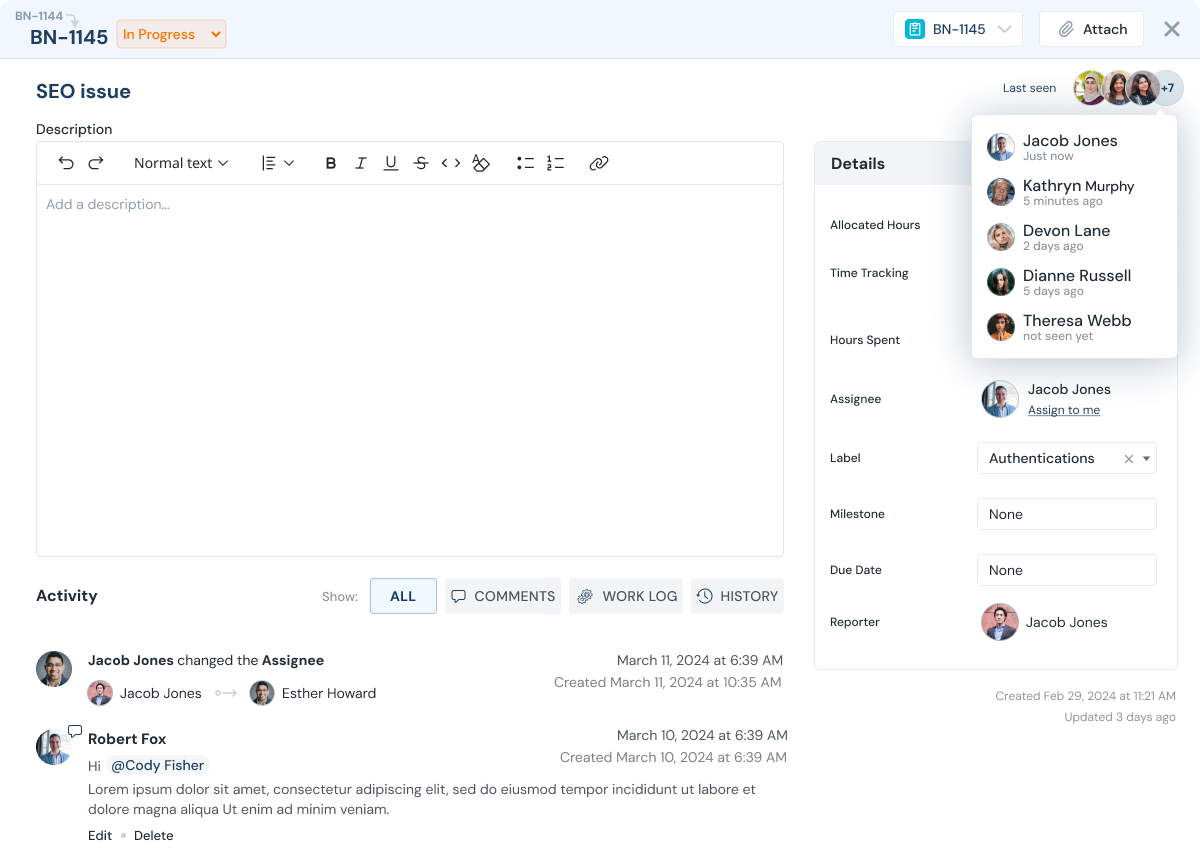
What teams struggle with
Operations work is constant - but it is often invisible until something breaks.
Internal work arrives from every direction: Slack, email, hallway conversations, and urgent requests.
TaskBoard helps you capture operational work, assign ownership, and make progress visible without creating more meetings.
- Requests fall through cracks when there is no single system of record
- Work is done, but not documented, so learning and improvement are slow
- Managers cannot see capacity and dependencies across the team
- Priorities shift without visibility into where time is going
How TaskBoard helps
Operations Teams Outcomes That Matter
Turn operational work into visible, measurable throughput.
Proof point: Teams can validate progress using task history, ownership updates, and worklogs without reconstructing status from separate tools.

Clear ownership
Know who is responsible for each task and what is currently blocked.

Worklog-driven accountability
Capture time + notes so leadership can see what got done and why it took time.

Milestones for initiatives
Group work into milestones and track progress against estimates.

Capacity and load balancing
See assignments and backlog to distribute work based on available capacity.
Feature stack
Features That Power This Workflow
Explore the features most commonly used by operations teams teams.

Execution flow
A simple ops workflow from intake to resolution.
Capture requests quickly, assign ownership, and rely on worklogs for weekly reporting.
Capture requests
Create tasks as requests arrive so nothing gets lost.
Triage and prioritize
Set priority and due dates so the team knows what matters most.
Assign ownership
Make owners and next steps explicit to avoid ambiguity.
Execute and log work
Add worklogs with time spent and notes to keep progress auditable.
Review and improve
Use reports to spot bottlenecks and adjust priorities or resourcing.
Walkthrough
See how ops teams keep work visible.
Watch how operations teams use TaskBoard for intake, execution, and reporting.
Value model
Flat Fee Pricing, No Per-User Fee
Include internal teams, contractors, and clients in one execution workflow without per-seat pricing friction.
FAQ
Operations FAQs
Common questions from ops and internal services teams.
Can we use TaskBoard for internal requests?
Yes. Many teams use TaskBoard as the central place for internal requests, ownership, and status tracking.
How do we keep progress visible without daily status meetings?
Worklogs make progress measurable. Leaders and managers can review work completed by project, team, or person.
Can we track initiatives as milestones?
Yes. Group tasks into milestones, estimate them, and track progress against actual worklogs.
Can we see team workload and capacity?
Yes. View assignments and backlog so managers can load-balance work across the team.
Do you charge per user?
No. TaskBoard pricing is a single company-wide flat fee, so cross-team collaboration does not increase cost.
Can other departments be invited as stakeholders?
Yes. Invite stakeholders with limited access so they can follow progress without seeing unrelated work.
Next step
Make ops work visible with TaskBoard.
Start a 30-day trial or request a demo focused on worklogs, reporting, and milestones.